I earn commissions when you sign up or buy through the affiliate links on this page, at no extra cost to you.
3D printing · Guide · By Mohammed Almuhanna · Updated
Best 3D Printer in 2026: Picks by Budget and Use Case
There is no single best 3D printer, only the best one for what you are doing and what you can spend. I run a Bambu Lab H2S, I started years ago on an Ender 3, and I have spent real time on a Bambu A1 and a Creality K2 Plus, both borrowed to print parts in parallel while my H2S worked through a big multi-part job. The one pick below I have not personally run is the budget Anycubic, and I say so when I get to it. Everywhere else I am telling you what the machine was actually like to use, not what the spec sheet promises.
The short version
On a budget, the Anycubic Kobra 3 is the cheapest machine I would trust today. The Bambu Lab A1 is the easy pick when you just want it to work and do not need an enclosure. The Creality K2 Plus buys you size and speed for the money. And for ASA, ABS, or functional parts that have to survive heat, you want an enclosed machine like the Bambu Lab H2S, which is what I run. Everything past here is the reasoning.
How to choose, in plain terms
- FDM, not resin, for most people. FDM melts plastic filament and is the right tool for functional parts, prototypes, and general printing. Resin is for fine miniatures and detail work, and it is messier and more involved. This guide is FDM.
- Enclosed or open. PLA and PETG print fine on an open printer. ASA and ABS warp and need a warm, draft-free chamber, so if you want heat-resistant parts you need an enclosure. This single question splits the whole market.
- Auto-leveling and a modern toolhead. The biggest jump from the old days is machines that level themselves and hold their settings. It is the difference between printing and fighting the printer. Every pick here has it.
- Bed size and speed matter only once you know you need them. Do not pay for a huge, fast machine to print small parts now and then.
- Ecosystem. Easy slicing, reliable filament handling, and multi-color options (like an AMS) make a real difference to how often you actually use the thing.
Best budget first printer: Anycubic Kobra 3
If this is your first machine and you do not want to spend much, the Anycubic Kobra 3 is the cheapest printer I would actually recommend. It auto-levels, prints fast enough, and supports multi-color, which is a lot of capability at the entry price. I have not run one myself, so I am going on its specs and reputation rather than my own bench time, but it is the budget answer for someone who wants to learn without a big outlay. The old advice was a Creality Ender, and that still works if you enjoy tinkering, but a Kobra 3 gets you to good prints with far less fuss.
Best no-enclosure all-rounder: Bambu Lab A1
For most people who want a printer that simply works and do not need ASA or ABS, the Bambu Lab A1 is the one I would point you to. I borrowed one to run parts in parallel while my H2S was tied up on a big multi-part job, kept it a while, and printed plenty on it. I like it a lot. It is fast, it auto-calibrates, it handles PLA and PETG cleanly, and the AMS option gives you tidy multi-color. The one thing I had to mind was airflow. It is open-frame, so a draft moving across the bed can disturb a print, and it is not the machine for heat-resistant materials anyway. Keep it out of a breezy spot and it just works, and for a no-enclosure all-rounder it is the easy call.
Best value workhorse: Creality K2 Plus
If you want a larger, faster machine and care about value, the Creality K2 Plus is a lot of printer for the money. Bigger build volume, high speed, enclosed, and multi-color support put it in workhorse territory at a price that undercuts the obvious names. I borrowed one alongside the A1 for that same parallel-printing stretch and ran a fair bit through it. My hesitation is reliability. I had prints fail on a second run that had succeeded the first time under what looked like identical settings, and I did not have the machine long enough to work out why. So I rate it strong value with a question mark I could not fully resolve in a few weeks. If your jobs are getting bigger and you want headroom without flagship prices it is worth a look, just budget some patience for dialing it in.
Best for ASA and functional parts: Bambu Lab H2S
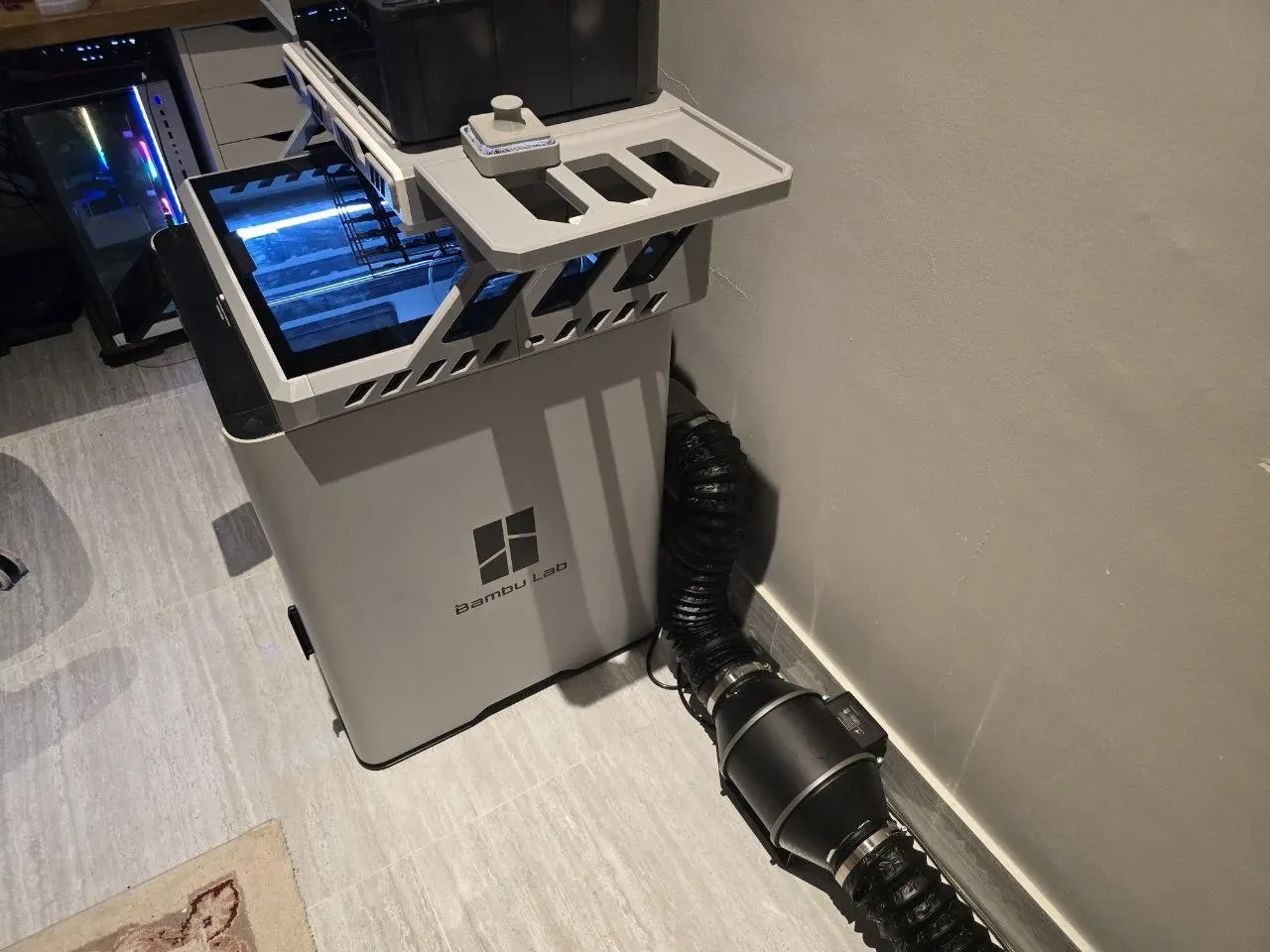
This is what I actually run. I print mostly ASA for functional parts that have to survive a hot, dusty Gulf climate, and that needs an enclosed machine that holds chamber heat so the corners do not lift. The H2S does that, handles the abrasive and high-temperature materials I throw at it, and the AMS keeps multi-material work tidy. I vent it out the window through an adapter I printed and an AC Infinity inline fan, because ASA and ABS give off fumes you do not want indoors. If your printing is functional rather than decorative, and especially if you need parts that hold up in heat, an enclosed machine like this is the one worth paying for.
What I would actually buy, by situation
| Your situation | The pick | Why |
|---|---|---|
| First printer, tight budget | Anycubic Kobra 3 | Cheapest machine that still auto-levels and prints well |
| Just want it to work, PLA and PETG | Bambu Lab A1 | Fast, self-calibrating, almost no fuss |
| Bigger and faster for the money | Creality K2 Plus | Large, quick, enclosed, strong value |
| ASA, ABS, functional parts in heat | Bambu Lab H2S | Enclosed chamber that prints heat-resistant materials cleanly |
Price the prints before you price the printer
The machine is the upfront cost; the prints have an ongoing one. Before you commit, it helps to know what a part actually costs in filament, power, machine wear, and failed prints. The 3D print cost calculator works that out, and if you are choosing a material for the printer, the filament types guide and the best filament for outdoor use guide cover which plastic fits which job.
Common questions
What is the best 3D printer for a beginner?
For a tight budget, the Anycubic Kobra 3 is the cheapest machine I would trust, since it auto-levels and prints well without much fuss. If you can spend a bit more and want the least friction, the Bambu Lab A1 just works for PLA and PETG. Either gets a beginner to good prints far faster than the older cheap-and-fiddly machines did.
Do I need an enclosed 3D printer?
Only if you print ASA or ABS, or any part that has to resist heat. Those materials warp without a warm, draft-free chamber. For PLA and PETG, an open printer like the Bambu Lab A1 is fine. If you want functional parts that survive heat, get an enclosed machine like the Bambu Lab H2S.
Is a Bambu printer worth it over a cheaper Creality or Anycubic?
For me, yes. Bambu costs more and you are paying to not fight the printer, and the AMS makes multi-color painless. If you actually enjoy tuning and maintaining a machine, Anycubic and Creality hand you more printer per dollar, and they are genuinely good now. I run a Bambu because I would rather print than fiddle with it at midnight, but that is a preference, not a law.
FDM or resin for a first printer?
FDM for almost everyone. It prints functional parts, prototypes, and general objects, and it is cleaner to live with. Resin is for fine detail like miniatures and is messier and more involved. Start with FDM unless detailed models are specifically what you are after.